
Welcome to this post on how to get a higher SEO ranking in search engines. My name is Josh and I have been working in the web design industry for some 20 years.
“The number one question all my clients ask me is: how can I get a higher ranking in search engines? How do I get on page 1?”
Is that why you are reading this post? If so, you are not alone. In this post we discuss the methods we have used to help our clients get a higher SEO ranking in search engines.
My own ranking varies daily, but I am normally on page 1 or 2. So it works, and we must be doing something right.
There are two ways to be seen in a search engine. You can pay for it with SEA (search engine advertising), or you can use what we call “organic” SEO (search engine optimisation). In this post we focus on SEO.

This guide covers ten steps:
- Step 1: How do search engines work?
- Step 2: What are keywords?
- Step 3: Keyword Planner from Google
- Step 4: Keywords and their competition rating
- Step 5: Keyword placement and SEO ranking
- Step 6: Yoast SEO plugin for WordPress
- Step 7: Build an SEO landing page
- Step 8: Using Google Search Console
- Step 9: Using Search Performance from Bing
- Step 10: Let’s connect the dots
Step 1: How do search engines work?
When search engines read or index your web page, they ask specific questions about your content. They ask a lot of questions, and the answers you provide on your web page determine your SEO ranking in their search results.
The first question a search engine asks is: have you provided a “keyword” or “phrase” on this web page, and where have you used it?
- Does the keyword or phrase appear in the title of your web page?
- Have you used the keyword in your URL?
- Have you used the keyword in your meta description?
- Have you used the keyword in your headings (H2, H3)?
- Have you used the keyword in your images?
- Have you used the keyword in your content?
- How fast does the page load?
- Is the website secure with HTTPS?
We need to answer all of these questions before a search engine will even look at our web page or website. If we answer them well, we get a higher SEO ranking.
It’s that simple.
You probably noticed that I highlighted the word “keyword”. Why? Because everything on the internet revolves around keywords or phrases. Let me explain.
Step 2: What are keywords?
It all has to do with the words you type into a search engine. Say you want a new TV. Let’s type “the best OLED TV” into Google. Within a fraction of a second, Google searches all the pages it has indexed on the internet and shows the results in our browser. Amazing, really.
The top results are web pages, posts or videos that use the words or phrase “best OLED TV”. So the words we use in our content, and where we use them, affect our SEO ranking in search engines. These words or phrases are what we call “keywords”.
Keywords are a bridge between the search engines and our web pages, posts and videos.
When we use the right keywords, search engines give our web pages priority in their SEO ranking. What are the right keywords? That is a great question.
To answer it, we need to know what users are entering into search engines. This information helps us work out the best keywords to use on our web pages. To do that, we use a free tool from Google called Keyword Planner.
Step 3: Keyword Planner from Google and SEO ranking
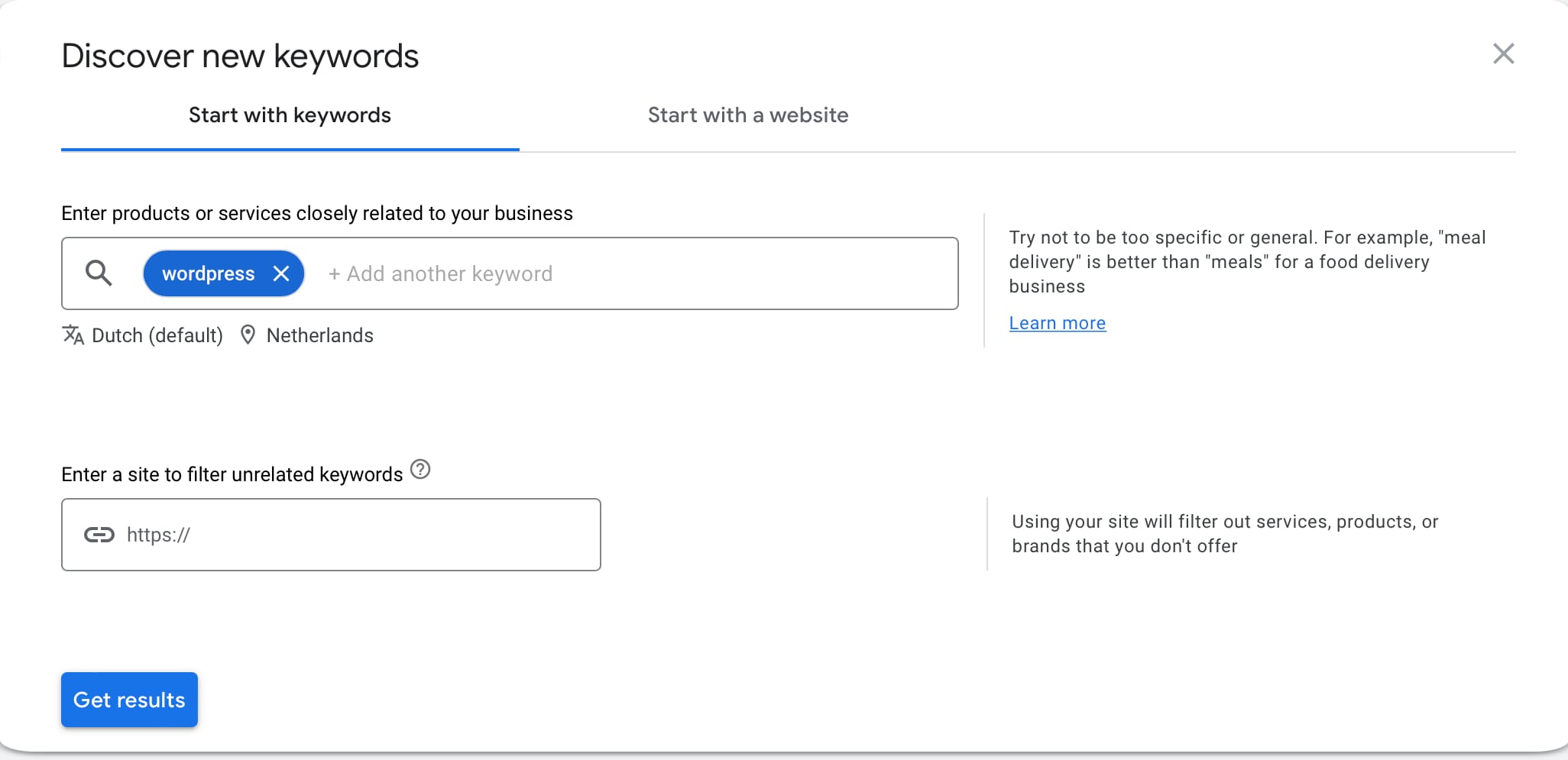
When you log in to Google AdWords, you will find a free tool that helps you find keywords: Keyword Planner. Under the heading “Discover new keywords”, type in “WordPress”.
The first image below shows the “Discover new keywords” page. The second shows the results page in Keyword Planner.
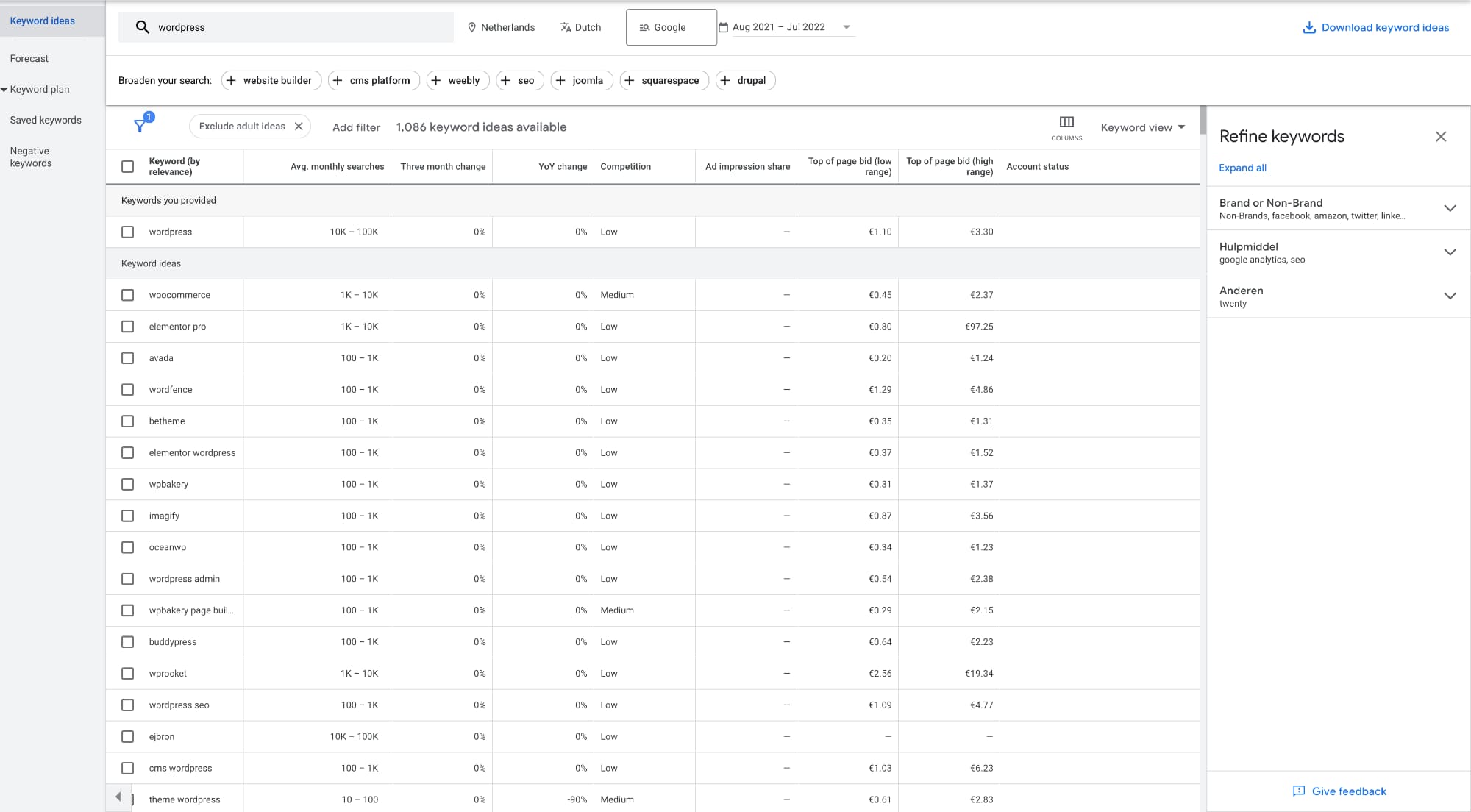
Notice that different columns give us data:
- First, there is the average monthly searches column.
- And notice the competition column.
We want to focus on these two columns.
Column: average monthly searches
Under the heading “Average monthly searches” we find a number. The results for WordPress are between 10K and 100K. What does that mean? It means this keyword was searched between 10,000 and 100,000 times within one month in the Netherlands.
How do we know that? At the top of the results page I chose the Netherlands as the country to search in, and Dutch as the language.
Note: if you have an active campaign, the results may be more precise.
Column: competition
Notice that this column says “Low” for the keyword “WordPress”. We are interested in how Google rates this word or phrase: low, medium or high. Why does that matter? Because to get a higher ranking through organic searches (results that appear in Google’s search engine but are not paid for), we need to know the keyword’s competition rating.
If the competition is too high, it becomes difficult to get a higher SEO ranking organically. Why? Good question.
Step 4: Keywords and their competition rating for SEO ranking
We want to choose keywords with a low competition rating because there is hardly any competition for them. Only a minority of websites or web pages use the keyword, and not many users search for it.
We can use that to our advantage. Take the keyword “WordPress SEO”, for example. It is searched some 100 to 1,000 times per month.
Because of its low competition, the chances that we end up within the first two pages of Google and Bing after optimising our web page are very high. By choosing keywords with a low competition rating, we increase our chances of a higher SEO ranking.
You may think 100 searches per month isn’t much. But that depends on your point of view. Let’s be honest: how many of us search beyond page 5 or 6 in Google or Bing?
I know I don’t. So our goal is to be seen within the first two pages of a search engine. You are better off with 100 views per month on page 1 than with a keyword that gets 45,000 views per month while you are on page 40 and no one ever clicks on your link.
So the reasoning behind our keyword choice is not about being seen by as many users as possible, but by users who see you on page 1 or 2. We achieve that by using various keywords to attract visitors. It’s all about the SEO ranking.
Step 5: Keyword placement and SEO ranking
Now that we understand the importance of the right words, we can focus on keyword placement. Here is how Google explains SEO in its SEO Starter Guide:
“Search engine optimization (SEO) is often about making small modifications to parts of your website. When viewed individually, these changes might seem like incremental improvements, but when combined with other optimizations, they could have a noticeable impact on your site’s user experience and performance in organic search results.”
Google, SEO Starter Guide
In other words, the keywords we use and where we use them affect the organic SEO ranking. To be honest, I could go into great detail about keyword placement, but it would bore you to death, so let’s keep it practical.
Here is a list to help you with keyword placement:
- Write your own content. Never, ever copy text from another web page.
- Include your keyword in the page title and URL.
- Include your keyword in the page’s meta description.
- Include your keyword in your headings.
- Include your keyword in the first paragraph of the page.
- Write at least 300 words per page or post.
- 2% of the words on your page should be keywords.
- Add at least one internal link and one external link to another website.
- Include your keyword in the image file name and alt text.
That is a lot of information to take in. Let’s make it easy.
Step 6: Yoast SEO plugin for WordPress
This is one of my favourite plugins: Yoast SEO. Why? Because this WordPress plugin gives us an analysis of our web page and its content. It is a visual guide, or a map, of the SEO on that page.
Here is a screenshot of my web page “WordPress tutorials”.
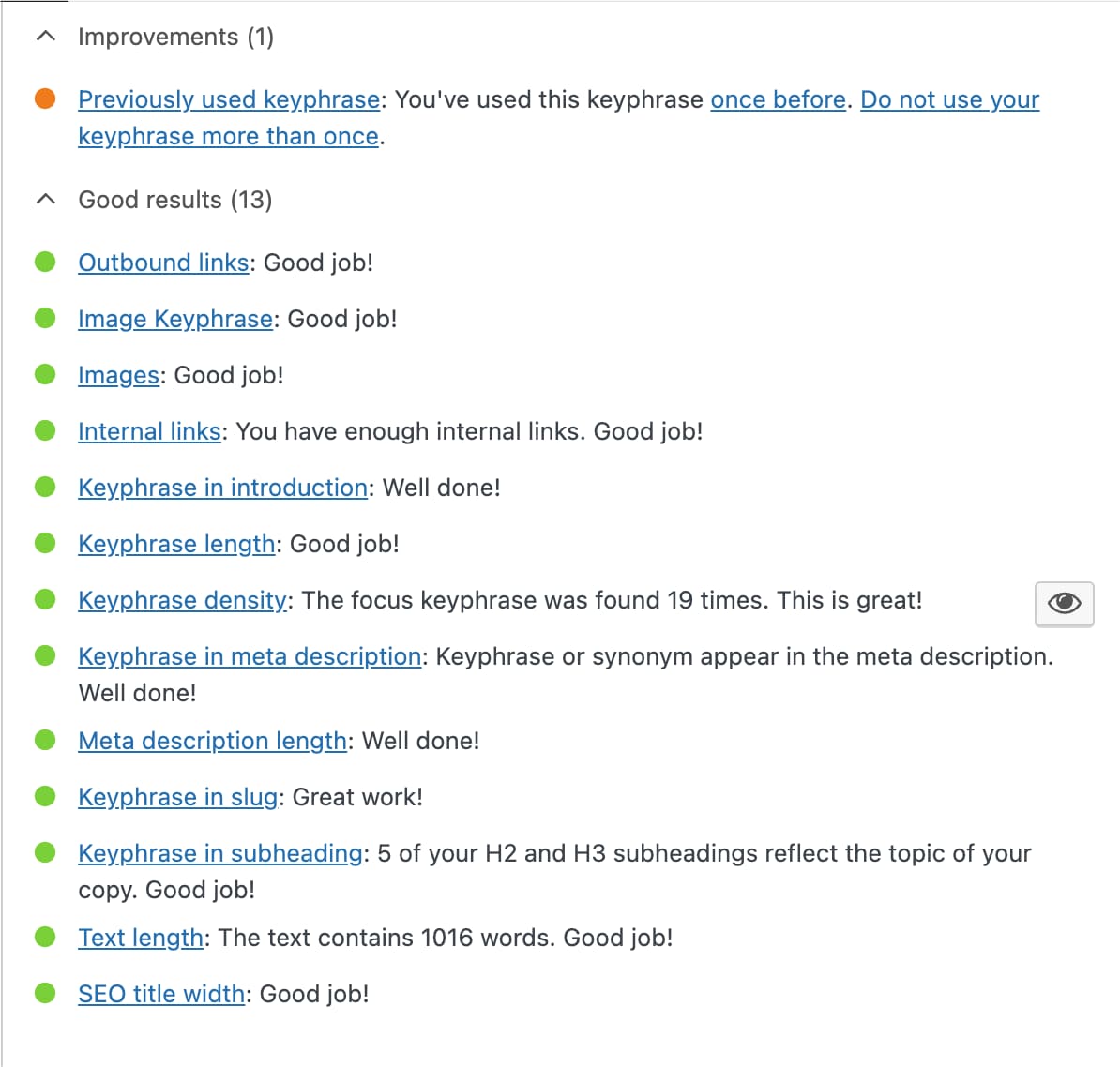
Notice that it lists basically everything we just covered in step 5. It reads your content automatically and, depending on what you have written, gives you advice to optimise the page for a higher SEO ranking.
This is one of my most used SEO tools, because it leads you through the SEO process, and it is free. I love free.
Step 7: Build an SEO landing page for your SEO ranking
So far in this post we have discussed which keywords to choose and where to place them. To be honest, this post isn’t about how to build an SEO page, but about keyword choice and placement. If you want to learn how to build websites, we have videos for that.
Here are a few examples of SEO landing pages we have built, to give you an idea of how to build one. We try to include a contact form where possible, and a call to action. We want visitors on this page to be led to our website or to other information about your keyword choice.
- Cape Marie: https://capestmarieapartments.com/woning-curacao-kopen/
- Ramm BV: https://ramm.nl/armmaaier/
- Turftroniq BV, autonomous mowing: https://www.turftroniq.com/autonomous-mowing/
Once you have built the SEO landing page and most of your Yoast SEO bullets are green, you are nearly ready. Now add the keyword to the text on your homepage and link it, with an internal link, to the SEO landing page. The reason is that most robots index the homepage first and then follow the links.
Step 8: Using Google Search Console
Still with us? Well done, you have learnt a lot about SEO methods.
Now that we have built our SEO landing page, we need to ask Google and Bing to index and rank our website and web page. For Google we use Google Search Console, which developers and webmasters use to ask Google to index a website or web page. This helps our SEO ranking.
In Google Search Console
- First, create a Search Console account.
- In the top left-hand corner, click “Add property”.
- It asks for a domain or a URL.
- Choose URL and add your website URL.
- You now have a choice: download an HTML file and add it to your server files via FTP, or choose an HTML tag and copy the meta name and verification code.
- Choose the HTML tag and copy the code.
<meta name="google-site-verification" content="HereIsALongCodeThatWeCanUse" />It should look like this, except the code will come from Google. Now let’s return to our WordPress website.
In the WordPress back end
- In the WordPress back end, go to Plugins and search for “Meta Tag Manager” (by Marcus Sykes).
- Install the plugin.
- Go to Settings, then Meta Tag Manager.
- Add a meta tag.
- Under “Tag type”, choose “name”.
- Under “Name value”, add “google-site-verification”.
- In the “Content attribute” field, add the code from Google Search Console: “HereIsALongCodeThatWeCanUse”.
- In the “Where to display this tag” field, choose “Front page”.
- Save, and you are done here.
Read an in-depth post on how to add meta tags with Meta Tag Manager.
Back in Google Search Console
Click “Verify” with the meta tag method and Search Console will verify your website. Excellent: we are now connected to Google Search Console.
Now that we are connected, we want to add a sitemap.
In the WordPress back end
- Go to the Yoast SEO plugin.
- Click “General” and then the “Features” tab.
- Next to “XML sitemaps”, click the question mark.
- Click “See the XML sitemap”.
- We now want the URL of the page sitemap. It should look like https://yourdomainname/page-sitemap.xml.
In Google Search Console
- On the left you should see a link called “Sitemaps”.
- Click “Sitemaps”.
- Add “page-sitemap.xml” to the URL and click “Send”.
Google will now index your website and read the pages. To be sure, we also want to add the URL of our SEO landing page and ask Google to index it.
In Google Search Console
- On the left, click “URL inspection”.
- Add the URL of your SEO landing page. Mine looks like this: https://www.thekiwiconnection.nl/tutorials-wordpress-met-video/
- Click “Send” again and the page is added to be indexed.
Well done: you have just submitted your website and web page to Google for indexing.
Step 9: Using Search Performance from Bing
Now that we have added our website and web page to Google, Bing makes it very easy for us. In Search Performance from Bing, we can import all the data from Google Search Console.
- Create an account for Search Performance in Bing.
- Click “Add a site”.
- Choose “Import from GSC” (Google Search Console).
- If you have more than one website in Search Console, choose which one you want to import.
- Bing now imports your sitemap and all the data, and indexes your website.
- Click “URL inspection” and add the URL of your SEO landing page, as we did in Search Console.
- That’s it. Indexing complete.
Step 10: Let’s connect the dots
Now that we have completed all the tasks needed to get the search engines to read our web page, it usually takes about a month before you start noticing a higher SEO ranking for your website.
What is happening? Let’s connect the dots.
By building an SEO landing page that is close to perfect, you get Google and Bing to give that one page a high ranking score. A high ranking score means a higher position in their search results, and because we chose a keyword with hardly any competition, you will climb the rankings quickly.
It wasn’t the website that got you a high ranking. It was the SEO page you built that took your website address to page 1 or 2 of the search results:
- The right keyword choice
- The right keyword placement
- Indexing your website
- Indexing your SEO landing page
Now that you know how to get a higher SEO ranking, it is time to create another SEO page and watch your website get more traffic. I hope this post helps you get higher rankings in search engines.
Thanks for your time. We look forward to catching up in the next post.
Regards,
Joshua de Hek
Front-end developer, webmaster, teacher

From invisible to page 1: SEO content that really works
What happens when you invest in SEO content structurally? For Panelen Holland the answer is now measurable.
Read the case From invisible to page 1: SEO content that really works
Localink | Style upgrade and a new customer portal
In January we updated the Localink website, now that they are a Certified B Corporation, and added a customer portal.
Read the case Localink | Style upgrade and a new customer portal
Viltopdemuur | Business focus, a new look and feel
A thorough redevelopment of Viltopdemuur.nl, an online shop for felt wall coverings, with a sharper business focus.
Read the case Viltopdemuur | Business focus, a new look and feel
